
CRM Training Services
SuvoCRM delivers CRM training services that cover end-user sessions, role-based training, admin enablement, new-hire onboarding, and custom playbooks on leading platforms, including Salesforce, HubSpot, and Dynamics 365. We teach the staff who avoid your CRM to work in it by habit. Tell us where your team gets stuck in the system.
What Are CRM Training Services?
CRM training services teach your team to use the CRM you already pay for with confidence, by hand and by habit. Sessions teach reps, managers, and admins the exact screens, fields, and steps their day-to-day job needs, not a generic product tour.
Our specialists tailor each session to your live configuration, so users practice on the pipeline, layouts, and reports they work in hour to hour. The result spans end-user skills, admin know-how, onboarding for new hires, and the documentation a team reaches for once the trainer steps away.
Good training is measured by what your team does after, not what they nodded along to. We aim for the moment recording a deal, pulling a report, or updating a contact feels automatic, not a chore someone keeps putting off.
Our CRM Training Services
CRM End-User Training Services
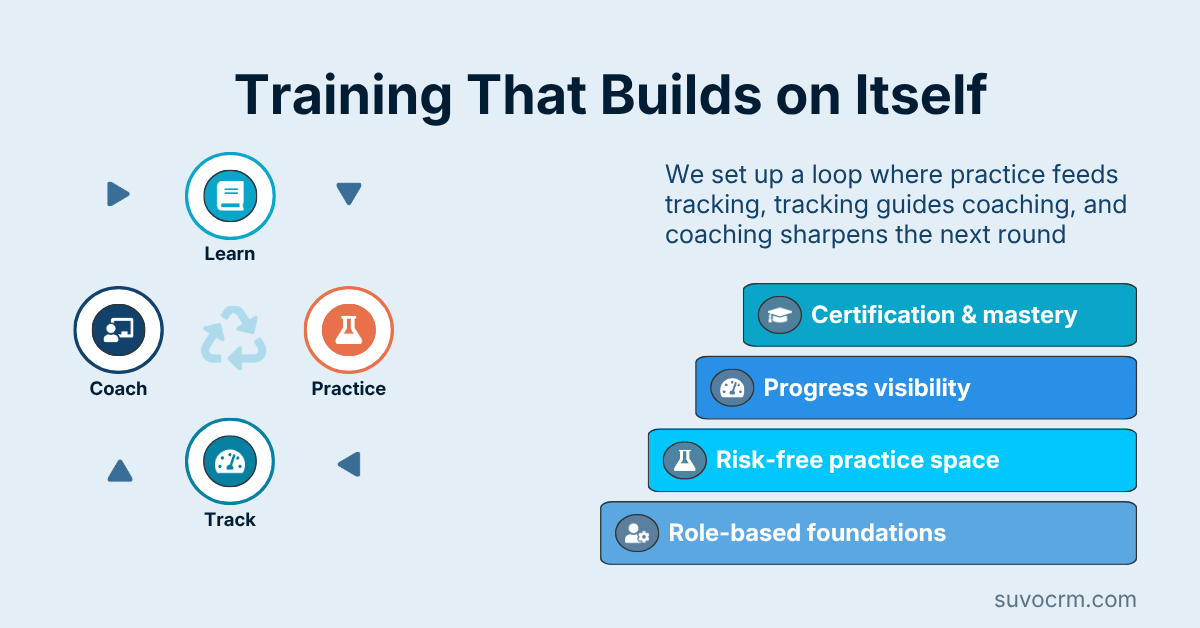
Reps adopt a CRM when it makes their day easier. We run hands-on sessions on recording activity, moving deals, and pulling the views they need, built on the configuration delivered through your CRM implementation services, so practice happens in the live system.
CRM Advanced Training Services
Someone on your side has to own the CRM once we step back. We coach your in-house admins on managing fields, layouts, permissions, and reports, drawing on the structure set during your CRM customization services so they can adjust it without breaking anything.
CRM New-Hire Onboarding Services
A new hire who masters the CRM in week one starts contributing far sooner than one left to guess. We build a repeatable onboarding path, backed by your ongoing CRM managed services, that gets each joiner productive fast and is kept current as your setup and team change.
CRM Adoption Coaching Services
Knowing which button to press is not the same as using the system by default. We coach managers and whole teams past the old habits that trap reps in spreadsheets, reinforcing the gains from your CRM optimization services so a cleaned-up CRM gets active use.
CRM Train-the-Trainer Services
Outside sessions fade when the trainer leaves, so we build a champion on your side. We coach your power users to lead future sessions in-house, drawing on the priorities surfaced in your CRM consulting services so the knowledge stays and spreads after we step back.
CRM Reference Guide Creation Services
The right answer to a how-do-I question is a guide your team already has. We write step-by-step playbooks, cheat sheets, and short videos for your setup, covering rules from your CRM automation services so your team knows what fires on its own and what they handle.
CRM Training Tailored to Your Industry
Each sector uses its CRM in its own language. A finance team trains on compliance fields and approval steps, while healthcare staff focus on consent capture and consult notes. Retail and manufacturing reps drill order and account workflows of their own. We have trained teams in more than 12 industries.
Common CRM Adoption Problems We Solve
Reps Quietly Avoid the CRM
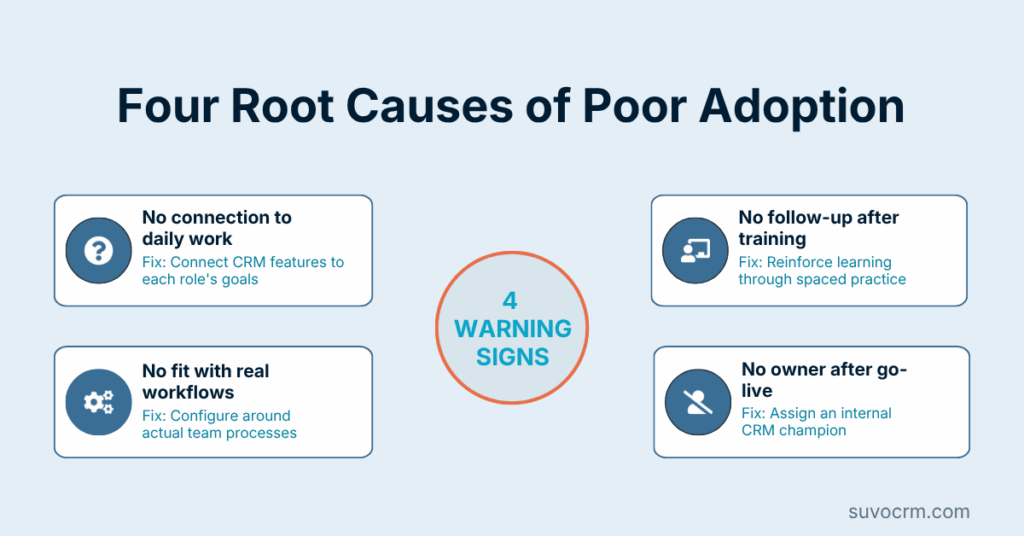
Reps hide their actual work in spreadsheets because the CRM feels like extra effort for no payoff. We show each one how the system saves them effort on their own tasks, so recording activity becomes the easy path, not a chore handed down from above.
Nobody Knows the Right Way
Five reps enter one deal five different ways because no one ever agreed on a standard. We teach one clear, shared method for the core tasks, so records stay consistent and managers can finally trust what the pipeline and reports are telling them.
New Hires Learn by Guesswork
Each joiner picks up the CRM by watching whoever sits nearest, copying their habits. We replace that with a repeatable onboarding path, so each new hire starts from one correct foundation, instead of inheriting another rep’s workarounds and gaps.
One Person Holds All the Knowledge
When the only admin who understands the setup is out or leaves, the whole team stalls on basic changes. We train backups and write down the how-to, so day-to-day CRM knowledge lives with your company rather than walking out the door with one employee.
Routine Record and Deal Handling
This is the bread and butter of CRM use: recording calls, updating fields, and moving deals through stages. We drill the core motions until they feel automatic, so reps hold records current in seconds and the data behind each report stays trustworthy.
Reporting and Dashboard Reading
A report nobody can build or read is a feature paid for and ignored. We teach managers to pull the views they need and read what the numbers mean, so leaders make calls from live CRM data without waiting on a colleague to export a spreadsheet.
Admin and Configuration Basics
Small changes should not require a consultant on call. We train your admins to add fields, adjust layouts, manage users, and tweak reports safely, so routine upkeep happens in-house, and the CRM keeps pace with how your team works week to week.
Search, Filters, and List Views
Most wasted CRM effort goes to hunting for records the wrong way. We teach the search tricks, filters, and saved list views that surface the right accounts in a click, so reps spend their hours working the list rather than building it from scratch.
Key CRM Skills We Teach Your Team
Why Choose SuvoCRM for CRM Training
Specialists Who Run Live CRMs
Our 30 CRM specialists work inside live client systems each week. Your team trains under practitioners who use these platforms hands-on, not career instructors.
Training Tied to Your Setup
Across 200+ CRM projects, product courses rarely stick. Sessions use your pipeline, fields, and reports, so reps practice what they learned the next morning.
No Vendor Steering the Lesson
No CRM platform holds a stake in our agency, so training teaches what helps your team, not what a vendor wants pushed. We coach on major CRMs and niche, industry-specific tools alike.
We Teach AI Features Too
We train teams to use the AI scoring and prediction we embed in platforms like Salesforce, HubSpot, and Dynamics 365. Your reps learn to read and trust those signals, not just click past them.
How Much Do CRM Training Services Cost?
Most CRM training engagements run between $2,500 and $18,000, set by how many staff you train, how many roles you include, and whether you want custom documentation alongside the sessions. We price to the work in front of us rather than a fixed per-seat tier.
A focused job, such as a single team’s end-user sessions or admin coaching for one or two people, usually lands in the $2,500 to $6,000 range. A wider rollout covering multiple roles, several sites, and a full set of playbooks reaches the upper end, since it means more sessions and more material written to your exact setup.
For companies that hire often and want training kept fresh, we offer a monthly retainer from around $1,200 that covers new-hire onboarding and refreshers. Each quote is written down, with the sessions and deliverables listed before we begin. Reach out for a figure matched to your team. what you pay before any work begins, and adjustments happen only if you request changes to the scope.
How Our CRM Training Process Works
Step 1: Assess
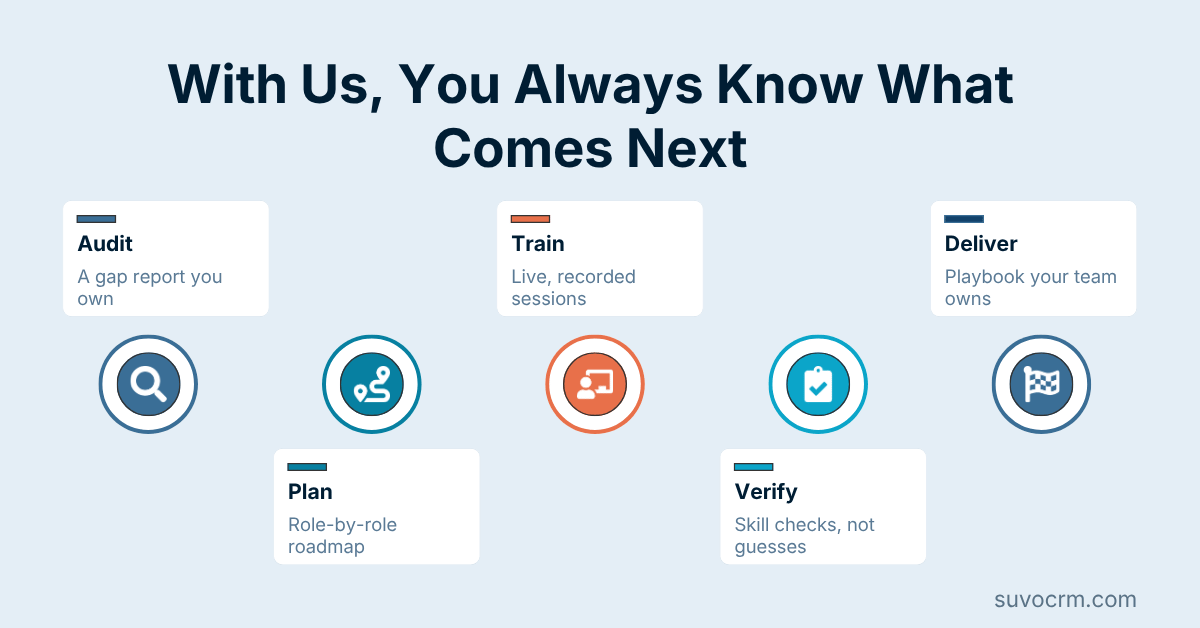
We watch how your team uses the CRM today and ask where each rep actually gets stuck. Our specialists note the gaps by role, so the training program targets the skills your team is missing, not a generic syllabus.
Step 2: Build
Next, we shape sessions and materials around your live setup. You see the outline and the playbook drafts up front, so the training matches your fields, workflows, and the way your team sells in practice.
Step 3: Teach
Then we run the hands-on sessions, live or remote, with each team working in the production system. Each group practices its own tasks, raises questions in the moment, and leaves able to do the job unaided.
Step 4: Reinforce
Last, we hand over the playbooks and check back after the staff has used what they learned. Our specialists answer the questions that surface in live use, so the new habits hold and do not fade within a week.
What Is the ROI of CRM Training?
Training pays for itself the moment your team stops fighting the CRM and starts working in it without a second thought. A system everyone can use is worth far more than one half the team avoids.
Over our projects, a trained team reaches confident daily use in about 2 to 3 weeks, rather than the months a team takes when left to figure it out alone. That earlier fluency is when the data, reports, and forecasts finally turn reliable.
The quieter saving is the interruptions that stop coming. From our work with clients, basic how-to requests to managers and admins fall by roughly 40 to 55 percent after good training. That hands hours back to the managers who once fielded them. Reach out and we will estimate the gain for your own team.
What Our Clients Achieve
Reps Who Use the CRM by Habit
The system becomes the default place where work happens, not a chore reps put off until Friday.
One Shared Way to Do Each Task
Everyone logs deals and records one agreed way, so the data behind reports finally lines up.
New Hires Productive in Week One
A clear onboarding path gets each joiner contributing in the CRM days after they start.
Admins Who Handle Changes In-House
Your own team adjusts fields, users, and reports without calling in outside help each round.
Managers Who Pull Their Own Reports
Leaders read live dashboards themselves and skip waiting on someone to export the numbers.
Far Fewer How-To Requests
Staff reach for the playbook before asking, so basic repeat questions stop landing on busy desks.
How to Get Started with CRM Training
A full training plan is not something you need worked out before reaching out. Drop where your team struggles most with the CRM into the contact field below, and we take the planning from there.
What follows is a plain conversation about who uses the system, which tasks trip them up, and what good routine use would look like for each role. We listen, ask pointed questions, and agree on the sessions worth running up front.
From there we shape a program that fits your budget and headcount, and you only commit once the sessions and deliverables sit in writing. Our team supports clients spanning the United States, Europe, and Asia. Send us the part of the CRM your staff avoid most and we will start there.