
What is CRM in Construction & How Does it Work?

CRM in construction is a system that stores every contact, bid, project lead, and client conversation in one place so estimators, project managers, and owners stop losing work to bad handoffs. It works by pulling data from emails, calls, site visits, and accounting tools into one shared record per client or job. The result is a faster pipeline, tighter follow-up on bids, and a paper trail that survives staff turnover.
Why builders trust our CRM guidance
Our team of 30 CRM specialists has shipped 200+ projects across 12+ industries, with 15+ certifications spanning Salesforce, HubSpot, ServiceNow, and niche construction-focused stacks. We are vendor-neutral, so the recommendation you read here is shaped by the job, not by a partner deal.
Need help choosing a construction CRM?
Reach out for a working session and we will map your bid pipeline, current tools, and field workflows to the platforms that actually fit. Our CRM consulting and implementation services are available 24/7 for global teams.
What Does CRM Stand For in Construction?
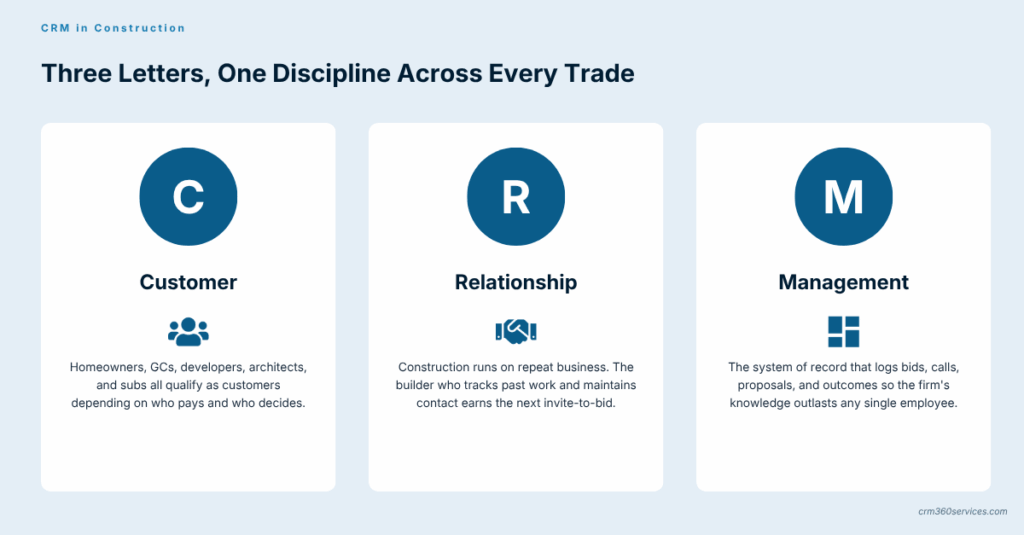
CRM stands for Customer Relationship Management, the same in construction as in any other sector. The acronym describes both the practice (how a builder manages buyers, GCs, owners, and architects) and the software that supports it.
The construction twist is in who the “customer” actually is. On a residential job it might be the homeowner, while on a commercial job the customer record often includes the developer, the GC, and the architect on the same project, each with separate contacts, contracts, and billing rules.
What Does CRM Mean for a Construction Company?
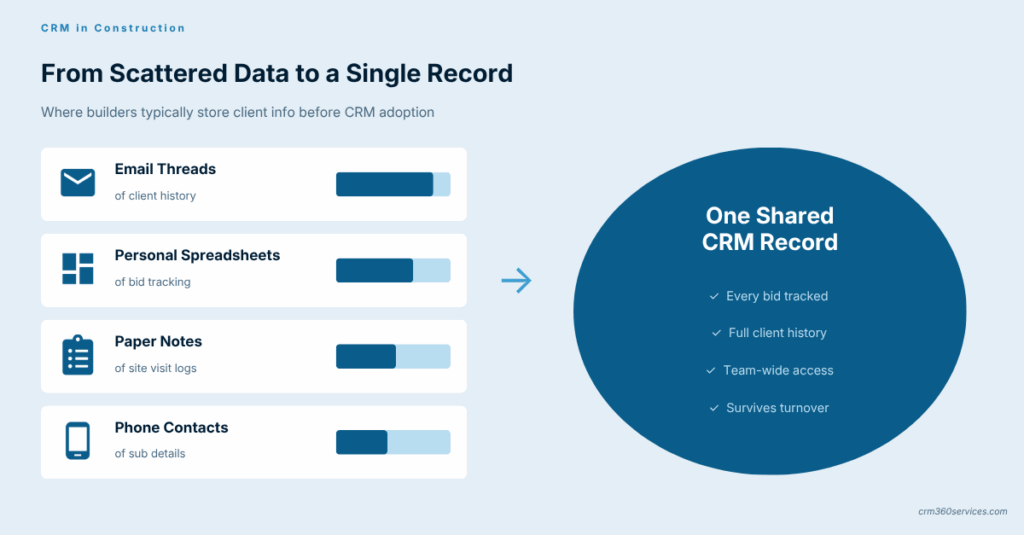
For a construction company, CRM means a single source of truth for every prospect, active client, subcontractor relationship, and historical bid. It replaces the email folder, the estimator’s spreadsheet, and the sticky note on the project manager’s monitor with one record everyone can read.
The practical effect is fewer dropped bids and shorter cycle times between RFP, takeoff, proposal, and signed contract. Field teams, office staff, and ownership see the same status on the same job at the same time, which kills most of the back-and-forth that wastes a workday.
What it changes day-to-day
- Bid follow-up stops slipping past the close date.
- Repeat clients are flagged the moment they request a new estimate.
- Subcontractor history travels with the company, not with one PM.
- Handoffs from sales to project delivery use a shared file, not a forwarded email.
From the field: Most builders we work with are not losing jobs on price, they are losing them because the second follow-up never went out or the proposal landed three days late, and a CRM is the cheapest way to fix both problems before hiring more estimators.
How Does Customer Relationship Management Work in Construction?
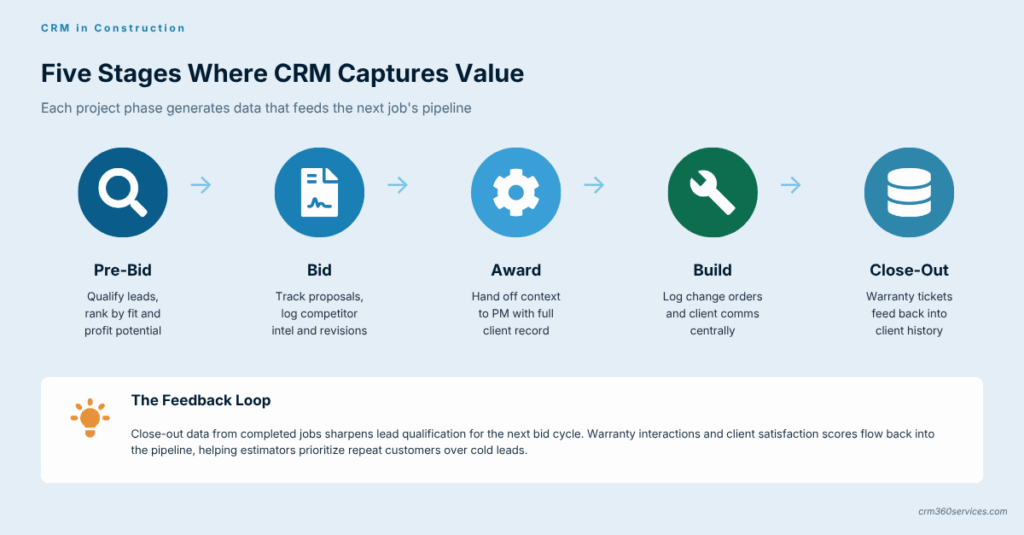
In construction, customer relationship management is the discipline of capturing every touch with a client or prospect and using that history to win the next job. It runs from the first cold inquiry through warranty work years after substantial completion.
A working CRM practice in this industry usually covers three streams running side by side. Lead capture from referrals, web forms, and trade events sits alongside active deal management, while post-handover relationship care protects the repeat revenue most builders underestimate.
Where CRM sits in a typical construction lifecycle
- Pre-bid: lead source, qualification, and decision on whether to chase.
- Bid: estimating data, proposal versions, competitor notes.
- Award: handoff to PM with full context attached to the record.
- Build: change orders and client communications logged centrally.
- Close-out and warranty: service tickets feeding back into the client history for the next job.
The same lifecycle is why a CRM doubles as the raw input for construction CRM analytics, since each stage produces measurable values (bid count, win rate, cycle time) that owners can read off a dashboard instead of rebuilding from memory at the end of the quarter.
What Are the Core Components of a Construction CRM System?
A construction CRM system is built from five components that work as one unit: a contact and company database, a deal pipeline, an activity log, an automation engine, and a reporting layer. Strip any one of these out and the rest fall over within a quarter.
The five components in plain terms
| Component | What it stores or does | Why builders need it |
|---|---|---|
| Database | Contacts, companies, jobs, sites, subs | Single source of truth across roles |
| Pipeline | Bid stages from inquiry to signed contract | Forecasting and bid hit-rate visibility |
| Activity log | Calls, emails, site visits, notes | Survives staff turnover; protects the relationship |
| Automation | Reminders, follow-up sequences, alerts | Stops bids from going cold |
| Reporting | Dashboards, win-rate, pipeline value | Owner-level decisions on hiring and capacity |
How Is a Construction CRM Database Structured?
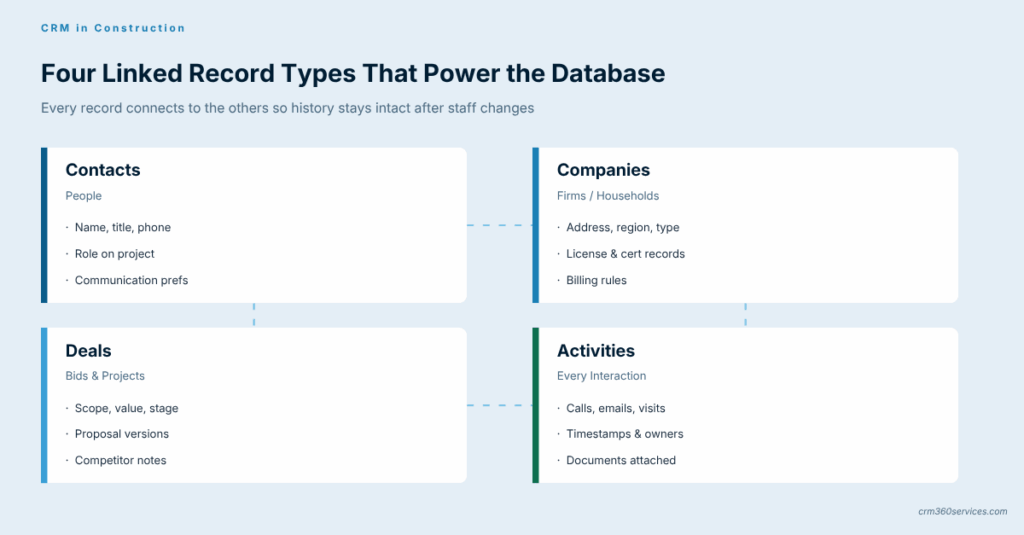
The database underneath a construction CRM is structured around four linked record types: contacts (people), companies (firms or households), deals (bids and projects), and activities (every interaction). Each contact belongs to a company, each deal links to one or more contacts, and every activity logs back against all three.
This relational structure is what makes the CRM useful when a senior estimator retires. The history stays attached to the company and the deal, not to the email account that just got deactivated.
Typical custom fields for a construction database
- Job type (residential, commercial, civil, remodel)
- Square footage or contract value range
- Trade or scope (concrete, MEP, framing, full GC)
- Lead source (referral, repeat, RFP board, web)
- License or certification requirements per region
Operational vs Analytical Construction CRM
- Runs the day-to-day pipeline
- Triggers follow-ups and tasks
- Logs calls, emails, site visits
- Used by estimators and PMs
- Reads the data the operational side creates
- Surfaces win rates by job type, region, lead source
- Forecasts revenue and capacity
- Used by owners and finance
Most builders need both, but they rarely buy them as separate products. Modern platforms ship operational and analytical CRM together, which is why the buying decision is more about depth in each layer than picking one camp over the other.
What Does Construction CRM Software Actually Do?
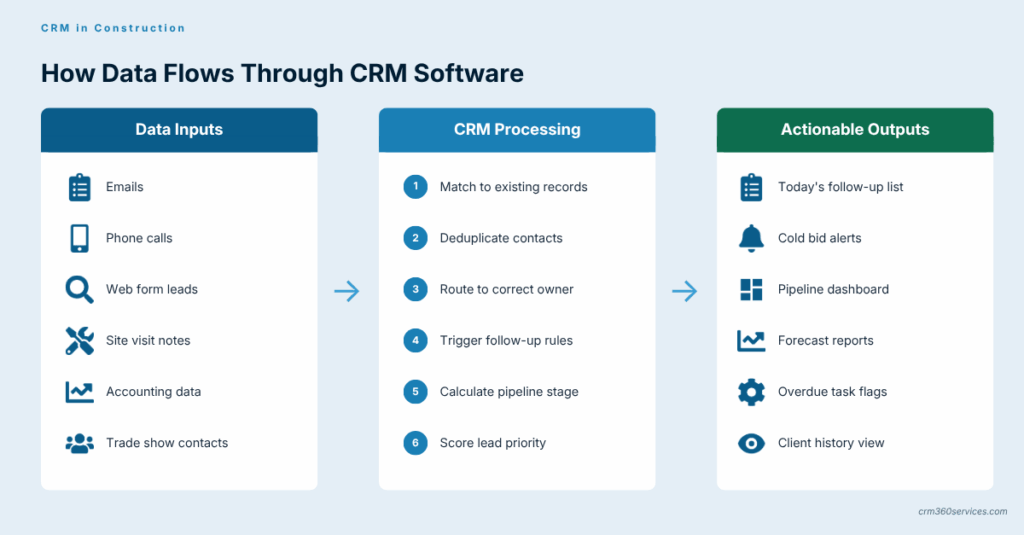
Construction CRM software captures, organizes, and acts on data from inquiries, bids, jobs, and post-completion service. It listens to email, web forms, phone systems, and accounting tools, then routes the right information to the right person at the right stage.
In practice, the software does four jobs no spreadsheet can do reliably. It alerts you when a bid is going cold, merges duplicate client records, surfaces a rolling pipeline value without anyone preparing a report, and keeps a permanent log even when staff change.
Stack enough of these triggers together and you arrive at proper construction CRM automation, where the system handles its own follow-up cadence, sends reminders to subs before insurance certificates lapse, and quietly removes hours of unbillable admin from the week.
From the field: Most builders we work with are not losing jobs on price, they are losing them because the second follow-up never went out or the proposal landed three days late, and a CRM is the cheapest way to fix both problems before hiring more estimators.
What Types of CRM Software Are There for Construction?
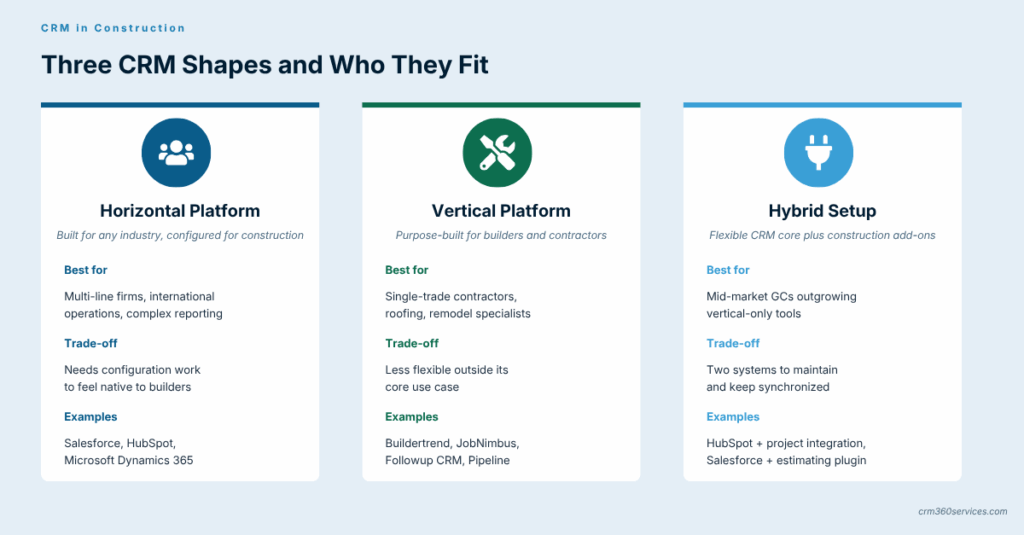
Construction CRM software comes in three broad shapes: horizontal platforms (built for any industry, configured for construction), vertical platforms (purpose-built for builders and contractors), and hybrids that pair a horizontal CRM with a construction-specific add-on.
Type #1: Horizontal Platforms
Horizontal platforms like Salesforce, HubSpot, and Microsoft Dynamics 365 are flexible and have huge ecosystems, but they need configuration to feel native to a builder. They suit firms with multiple business lines or international footprints.
Type #2: Vertical Platforms
Vertical CRMs are built specifically around bid management, takeoffs, and job costing. Tools like Buildertrend, JobNimbus, Followup CRM, and Pipeline drop into a contractor’s workflow with less custom work, and most of the standout names recur across our review of the strongest CRMs for contractors precisely because they remove configuration overhead.
We also frequently see niche residential remodel and roofing-specific systems where the use case is narrow enough to justify a purpose-built tool over a configurable platform.
Type #3: Hybrid Setups
Hybrid setups pair a flexible CRM core with a construction-specific layer. HubSpot plus a project management integration, or Salesforce plus a vertical estimating tool, is common with mid-market GCs who outgrow vertical-only tools but do not want full custom development.
Cloud vs On-Premise Construction CRM Software
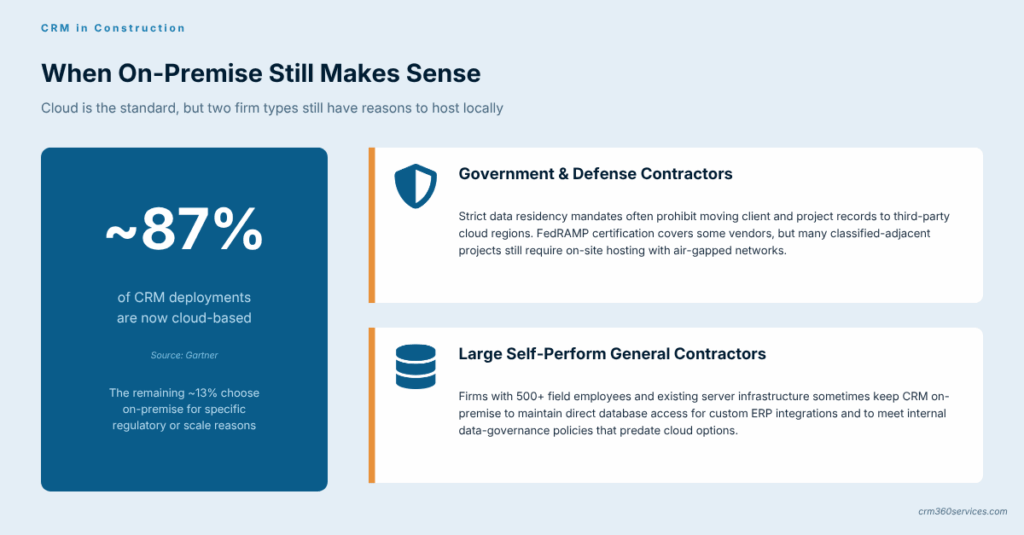
For nearly every construction firm today, cloud CRM is the default and on-premise is the exception. Cloud handles updates, security, and mobile field access without the IT headcount most builders do not have.
On-premise still appears in two cases. Government and defense contractors with strict residency requirements, plus very large self-perform GCs with specific data control mandates, still buy locally hosted systems.
Quick comparison
| Factor | Cloud CRM | On-Premise CRM |
|---|---|---|
| Upfront cost | Low (subscription) | High (licenses + hardware) |
| Field access | Native mobile | Requires VPN or extra build |
| Updates | Automatic | Manual, scheduled |
| Data residency control | Vendor-managed regions | Full local control |
| IT staff required | Minimal | Dedicated admin |
Which Features Matter Most in Construction CRM Software?
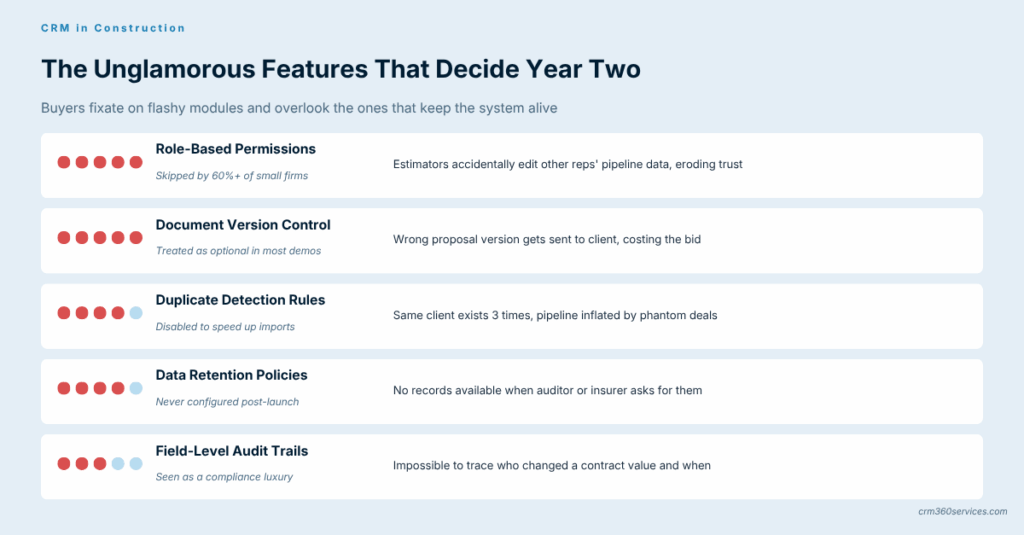
The features that matter most in a construction CRM are the ones that shorten the bid cycle and protect the client relationship after handover. Everything else is a nice-to-have that should not drive the buying decision.
Most buyers fixate on flashy modules and ignore the unglamorous ones (permissions, document version control) that quietly determine whether the platform survives year two, which is why our breakdown of essential construction CRM features ranks them by daily use rather than by demo appeal.
The non-negotiables
- Bid pipeline with custom stages
- Document storage for proposals and contracts
- Email and calendar sync
- Mobile app for field updates
- Job-costing or accounting integration
- Role-based permissions
How Is AI Showing Up in Construction CRM Software?
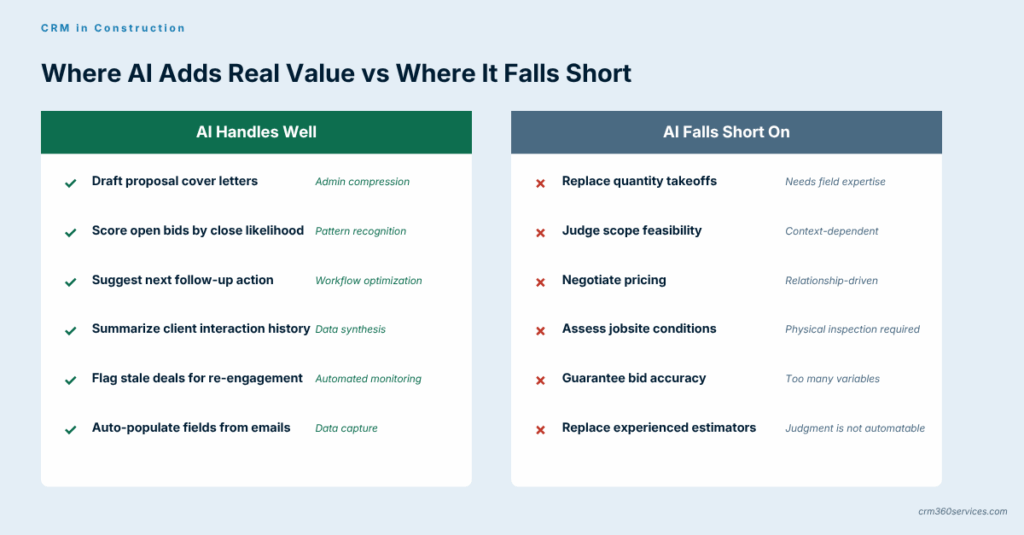
AI in construction CRM today is mostly about three concrete tasks: drafting proposal language, scoring which bids are most likely to close, and surfacing the next best follow-up action. These are real, shipping features, not roadmap items.
What AI is not, in this industry, is a magic estimator. It does not replace takeoffs or judgment on scope, and any vendor pitching it that way is overselling.
The honest framing is that AI compresses the admin tail of selling work, which is plenty of value on its own, and the measurable wins documented in early construction CRM and AI rollouts sit firmly in that admin layer rather than in any takeoff replacement.
Which Construction CRMs Include Marketing Tools?
Marketing-capable construction CRMs combine email campaigns, landing pages, and lead capture forms with the same database that powers the sales pipeline. The advantage is that a homeowner who downloads a remodel guide on Monday shows up as a qualified lead in the estimator’s pipeline on Tuesday.
For residential builders and remodelers, this matters more than for commercial GCs. Brand and content marketing drive the funnel in residential, while commercial work runs on relationships and RFPs that marketing tools touch less directly, which is one reason the strongest CRMs for residential construction tend to lead with marketing automation rather than estimating depth.
What Is a Sales-Focused Construction CRM?
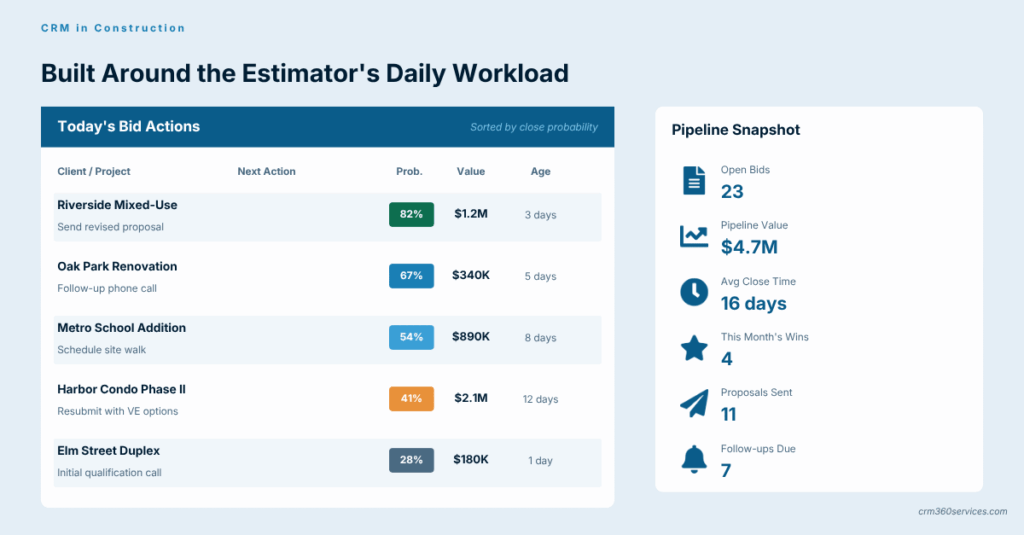
A sales-focused construction CRM is built around the bid pipeline and the estimator’s daily list. The tooling prioritizes call logging, follow-up sequences, proposal tracking, and win/loss analysis over campaign features.
This style suits commercial subs and specialty trades that live or die on bid volume, where shaving two days off proposal turnaround can mean two extra wins per quarter, and the price bands across today’s leading construction sales CRMs reflect exactly that focus on speed.
What Should a Mobile Construction CRM App Do?
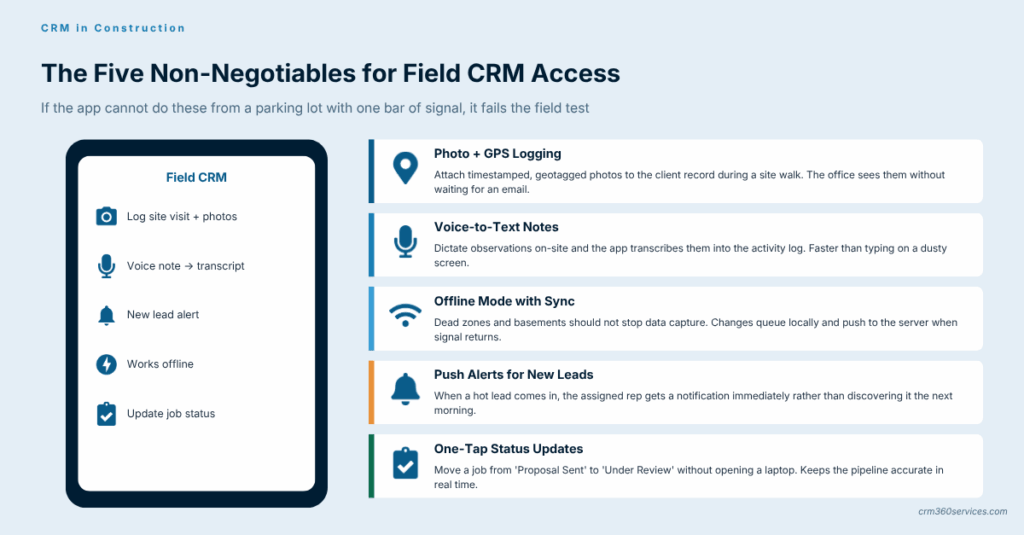
A mobile construction CRM lets the field read and write to the same record the office sees, from a phone, in a parking lot, with one bar of signal. That is the bar, and anything less is a glorified email app.
What a good mobile CRM does
- Logs site visits with photos and GPS
- Captures voice notes that transcribe into the activity log
- Pushes new lead alerts to the right rep
- Works offline and syncs when signal returns
- Updates job status without opening a laptop
How Do Construction Teams Actually Use CRM Daily?
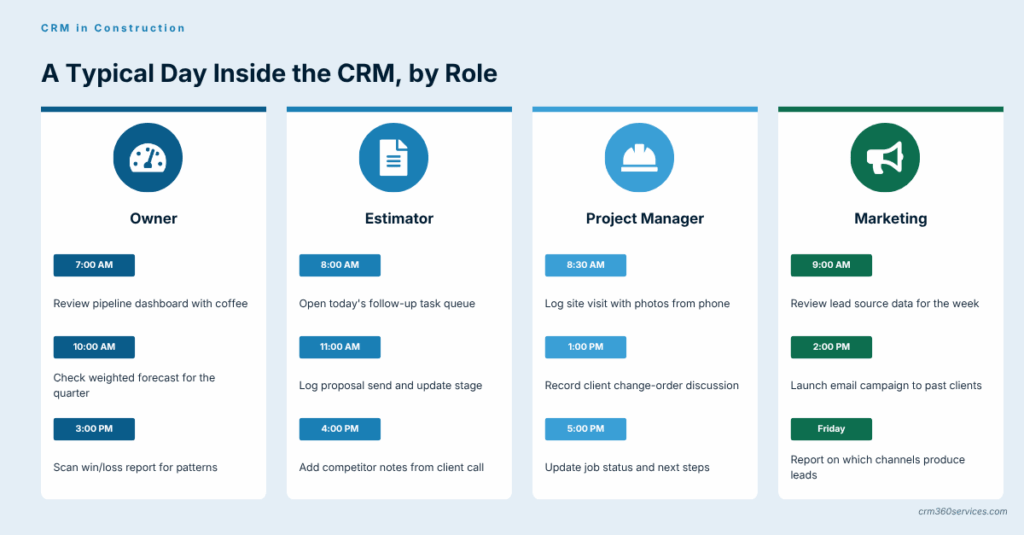
Daily use looks different by role but feeds the same database. An estimator updates bid stages and logs proposal sends, while a PM logs change orders, site visits, and client conversations against the relevant job record throughout the workday.
The owner reads the pipeline dashboard with morning coffee. Marketing reviews lead source data at the end of the week to decide which channels deserve more budget.
Adoption tip: The fastest path to daily use is making the CRM the only place a specific task can be completed, so if a proposal cannot be sent without logging it, logging happens, while optional usage gets ignored within a month no matter how clean the interface looks on the demo call.
Construction CRM for Sales vs Marketing Teams
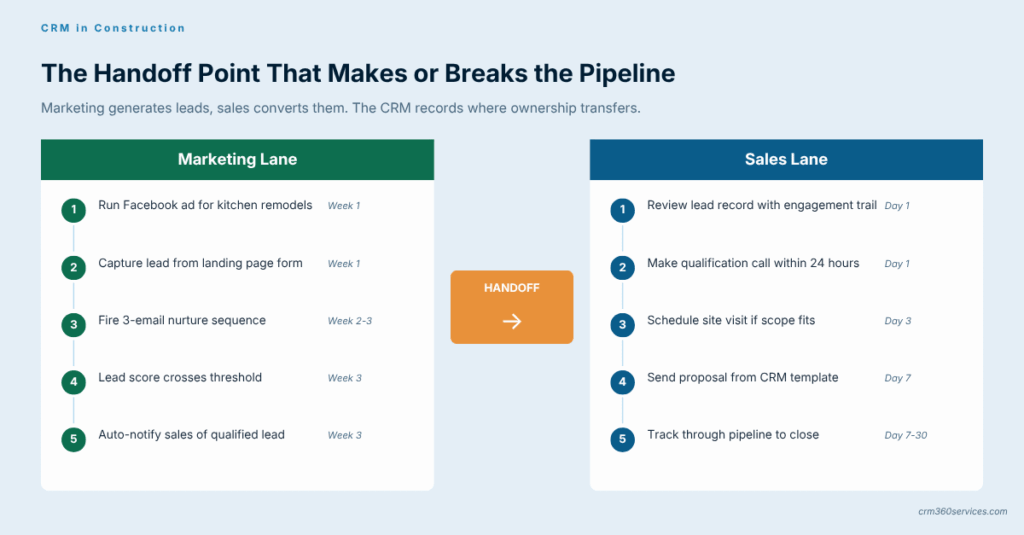
Sales teams use the CRM to move deals through stages, schedule follow-ups, and produce a clean pipeline forecast. Marketing teams use the same database to segment past clients, run nurture campaigns, and feed qualified leads into the sales pipeline.
The friction point between the two functions is almost always lead qualification rules. A clear definition of what counts as a sales-ready lead, written in the CRM as a stage or score, is what prevents the usual marketing-versus-sales finger-pointing.
Who Uses CRM in a Construction Organization?
Inside a construction firm, the CRM is used by five distinct roles, each touching a different slice of the data. The mistake we see most often is buying based on what one role wants and ignoring the other four.
The five roles and what they each need
| Role | Primary CRM use | What they care about |
|---|---|---|
| Owner / Principal | Pipeline value and forecast | Dashboards, not data entry |
| Estimator | Bid pipeline, proposal tracking | Speed and document handling |
| Project Manager | Client comms, change orders | Easy logging from the field |
| Marketing | Lead capture and nurture | Forms, segments, email |
| Admin / Office | Data hygiene, reporting | Permissions and merge tools |
How Does a Construction CRM Connect to Existing Workflows?
A construction CRM connects to existing workflows through integrations with accounting, project management, takeoff, and email tools. The CRM does not replace these systems; it sits next to them and shares the customer record.
Common integration targets
- Accounting: QuickBooks, Sage, Xero, Foundation
- Project management: Procore, Buildertrend, Monday
- Estimating and takeoff: PlanSwift, STACK, On-Screen Takeoff
- Email and calendar: Microsoft 365, Google Workspace
- E-signature: DocuSign, Adobe Sign
The trickier part of any rollout is sequencing these connections so the accounting sync does not overwrite a CRM field the estimator just updated, which is the kind of edge case our work on construction CRM integration projects tends to surface in the first sprint.
How Does Construction CRM Improve Customer Retention?
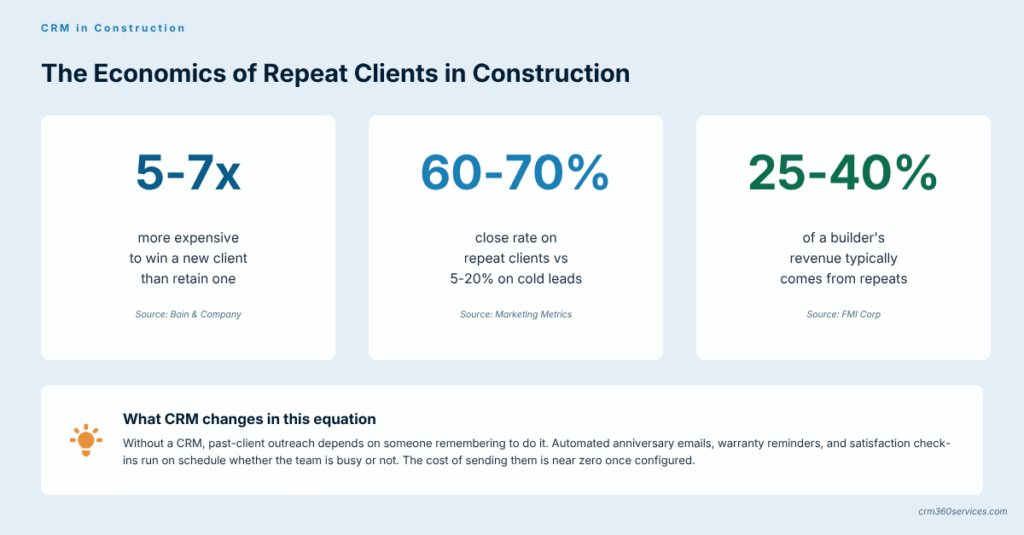
A construction CRM improves retention by making the second sale easier than the first. Past clients are the highest-margin pipeline a builder has, and a CRM keeps them from getting forgotten the moment the punch list is signed.
Three mechanics drive the gain. Warranty and service ticket history stays attached to the record, anniversary triggers prompt outreach without anyone remembering, and referral source tracking shows which past clients are sending the most work.
What Are the Social CRM Capabilities in Construction?
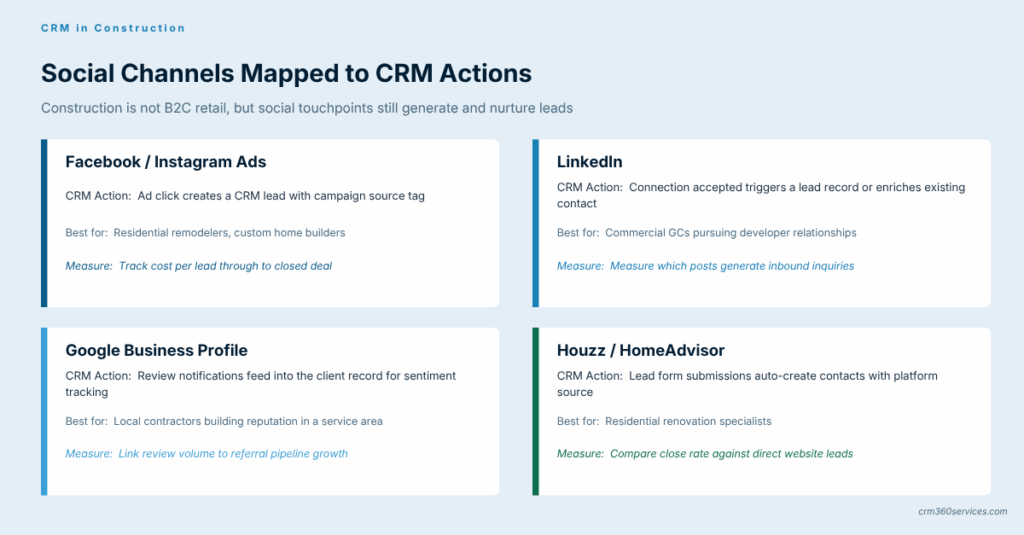
Social CRM in construction means pulling LinkedIn, Facebook, and Instagram interactions into the customer record alongside email and call logs. For residential builders, social is often the top lead source, so this layer is not optional.
The realistic use cases are tighter than the marketing pitch. Tracking which Facebook ad drove a homeowner inquiry, logging LinkedIn outreach from a business development rep, and surfacing reviews are the three that actually deliver value.
What Are the Most Common Construction CRM Myths?
The most common construction CRM myths cluster around four ideas: that the tools are only for big GCs, that adoption is hopeless after one bad attempt, that custom workflows do not fit, and that CRM will overlap with project management software in confusing ways.
How Does Construction CRM Support Compliance?
A construction CRM supports compliance by creating an audit trail of contracts, communications, and approvals that lives outside any one person’s inbox. For licensed trades, government work, and any project under prevailing-wage rules, that trail is not optional.
The compliance layer is also where construction CRM security earns its keep, since field-level encryption, role-based access, and tamper-evident logs are what turn a nice-to-have audit trail into one that actually holds up when an insurer or regulator asks for it.
Compliance jobs the CRM should handle
- Document version control on contracts and change orders
- Permission rules on who can edit financial fields
- Activity timestamps for client approvals
- Data retention aligned to regional rules
- Export-ready records for audits and disputes
Watch out: The audit trail only protects you if the team uses the CRM for the conversations that matter, because a side-channel text thread between a PM and an owner about a change is invisible to the system, and that is exactly where disputes start long after the project has closed out.
Which CRM Terms Should Construction Teams Know?
Construction teams meeting CRM terminology for the first time tend to get tripped up on a small set of terms that mean something specific in CRM but something else on a jobsite. Getting these straight on day one saves hours of confused meetings later.
Quick glossary
| Term | What it means in a CRM |
|---|---|
| Lead | A person who has shown interest but is not yet qualified |
| Contact | A qualified individual person record |
| Account / Company | The firm or household the contact belongs to |
| Deal / Opportunity | A specific potential project with a value |
| Pipeline | The sequence of stages a deal moves through |
| Activity | A logged call, email, meeting, or note |
| Workflow | An automation triggered by a stage or field change |
Construction CRM vs Spreadsheets
The honest comparison is not whether a CRM beats a spreadsheet. It does, comfortably.
The real question is at what size does the spreadsheet become a liability, and the answer for most builders is somewhere between five and fifteen active bids per month.
Where the spreadsheet breaks first
| Pain point | Spreadsheet | CRM |
|---|---|---|
| Multiple users editing | Conflicting versions | Real-time, role-based |
| Follow-up reminders | Manual or none | Automated |
| Mobile access | Read-only at best | Native apps |
| Reporting | Built by hand each time | Live dashboards |
| Audit trail | Lost on overwrite | Full history retained |
For very small operations, a spreadsheet plus disciplined email filing can stretch further than people admit, but the wheels usually come off the moment a second estimator joins or the first multi-phase project lands, and the deeper case for why construction firms need a dedicated CRM walks through those exact tipping points.
Construction CRM FAQ
Disclaimer: This content is for informational purposes only and should not be treated as professional, legal, or financial advice. All information is provided as-is without warranty, and we encourage verifying details directly with the relevant vendor before making any decisions.